Enable Kunlunxin GPU Topology-Aware Scheduling
Kunlunxin GPU topology-aware scheduling is now supported via kunlunxin.com/xpu resources.
When multiple XPUs are configured on a single P800 server, performance is significantly improved when the GPU cards are connected to, or located within, the same NUMA node. This arrangement forms a topology among all the XPUs on the server, as shown below:
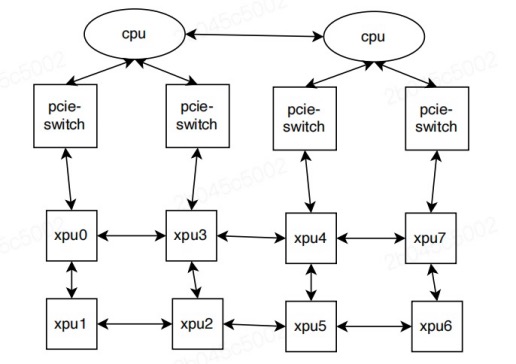
When a user job requests a certain number of kunlunxin.com/xpu resources,
Kubernetes schedules the pods onto appropriate nodes with the goal of minimizing fragmentation
and maximizing performance. The xpu-device then performs fine-grained allocation
of the requested resources on the selected node, following these rules:
- Only 1, 2, 4, or 8-card allocations are allowed.
- Allocations of 1, 2, or 4 XPUs must not span across NUMA nodes.
- Fragmentation should be minimized after allocation.
Important Notes
- Device sharing is not supported at this time.
- These features have been tested on Kunlunxin P800 hardware.
Prerequisites
- Kunlunxin driver >= v5.0.21
- Kubernetes >= v1.23
- kunlunxin k8s-device-plugin
Enabling Topology-Aware Scheduling
- Deploy the Kunlunxin device plugin on P800 nodes. (Please contact your device vendor to obtain the appropriate package and documentation.)
- Deploy HAMi according to the instructions in
README.md.
Running Kunlunxin Jobs
Kunlunxin P800 GPUs can be requested by containers using the kunlunxin.com/xpu resource type.
Below is an example pod specification:
apiVersion: v1
kind: Pod
metadata:
  name: gpu-pod1
spec:
  containers:
    - name: ubuntu-container
      image: docker.io/library/ubuntu:latest
      imagePullPolicy: IfNotPresent
      command: ["sleep", "infinity"]
      resources:
        limits:
          kunlunxin.com/xpu: 4 # requesting 4 XPUs